Default Configuration
This page describes what is inside the crowdsecurity/appsec-bot-challenge collection, so you know what behavior installing it enables. None of it requires an extra install step.
The two appsec-configs it installs
Bot detection is split in two: one config computes a score, another decides what score is too high. You can swap the threshold without touching the scoring, which is the point of the split.
crowdsecurity/appsec-bot-challenge-scoring serves the challenge and weights the fingerprint:
name: crowdsecurity/appsec-bot-challenge-scoring
inband:
  on_challenge_submit:
    - filter: EvaluateMismatches().Has("cdp")
      apply:
        - AddRequestScore(100, "cdp")
    # ... one rule per signal, see the table below
  post_eval:
    # Challenge every request. Verified bots and well-known paths are flagged by
    # the exclude-configs' pre_eval hooks and skipped by SendChallenge itself.
    - filter: "true"
      apply:
        - SendChallenge()
crowdsecurity/appsec-bot-challenge-scoring-balanced is the threshold, and is the only rule that rejects:
name: crowdsecurity/appsec-bot-challenge-scoring-balanced
inband:
  on_challenge_submit:
    - filter: RequestScore() >= 75
      apply:
        - 'RejectSubmission("request score " + string(RequestScore()), "verbose")'
How a request is scored
Every signal that fires adds points. Scores accumulate, so a client tripping two moderate signals can cross a threshold that neither would reach alone.
| Points | Signals | Why this weight |
|---|---|---|
| 100 | cdp, webdriver, webdriver_writable, selenium, playwright, webdriver_iframe, webdriver_worker, bot_user_agent | An automation framework is driving the browser, or the client declares itself a bot in its User-Agent. There is no honest reason for these to be present on a client that solved the challenge. |
| 50 | headless_screen_resolution, missing_chrome_object, impossible_memory, inconsistent_etsl, mismatch_webgl_worker, mismatch_platform_iframe, mismatch_platform_worker | Headless environments and cross-context inconsistencies. Hard to fake away, but each has a thin tail of real clients. |
| 30 | platform_mismatch, gpu_mismatch, high_cpu_count | Suspicious, but reachable by odd-but-real setups: VMs and remote desktops. |
| 15 | utc_timezone, ua_mobile, accept_language | Common enough among real visitors that acting on one alone would be a false positive. Servers, VPNs and privacy tooling all produce a UTC timezone. |
| 5 | swiftshader_renderer, mismatch_languages, timezone_country | Only meaningful in aggregate. timezone_country fires on any traveller or VPN user. |
A headless Chrome driven over CDP in a UTC container scores cdp=100 plus utc_timezone=15, so 115. That is over every threshold below.
Choosing a threshold
Three bundles ship the same scoring engine and exclusions, and differ only in where they reject:
| Collection | Rejects at | Use when |
|---|---|---|
crowdsecurity/appsec-bot-challenge | >= 75 | The default. Catches automation frameworks and headless browsers without acting on weak signals. |
crowdsecurity/appsec-bot-challenge-strict | >= 45 | You would rather turn away a few real visitors than let a bot through. |
crowdsecurity/appsec-bot-challenge-permissive | >= 100 | Only near-certain automation. Minimises false positives. |
Install exactly one of them. They are also built from three reusable collections, if you want to compose your own bundle:
| Collection | Contains |
|---|---|
crowdsecurity/appsec-bot-challenge-scoring | The scoring engine, which serves the challenge and computes the score but never rejects |
crowdsecurity/appsec-bot-challenge-good-bots | The four verified-bot exclusion configs |
crowdsecurity/appsec-bot-challenge-exclude-paths | The five path exclusion configs |
Bad bots it rejects
A submission over the threshold is refused a cookie and logged. With the "verbose" verbosity the shipped configs use, the line carries the fingerprint fields too:
time="2026-08-18T11:41:11Z" level=info msg="on_challenge_submit rejected" automation=true bouncer=127.0.0.1 component=appsec_runtime_config cpu_count=2 fp_time=1787053271061 fsid=FS1_000010000000000100000_00010h02ba_1280x1024c02m08b00011h40bcfb_f10001111000101111000111111111e00000000p1100h-2d436_0h6526db_1h-53968_en2tUTC_h-48c_0100h6ae994 is_bot=true language=en-US memory=8 module=acquisition.appsec name="127.0.0.1:7422/" nonce=kiyhg7p428e platform=Linux reason="request score 115" request_uuid=0a85dc9c-57fd-459a-b9d9-14420d923e79 signals="[cdp utc_timezone]" source="::1" timezone=UTC type=appsec ua="Mozilla/5.0 (X11; Linux x86_64) AppleWebKit/537.36 (KHTML, like Gecko) Chrome/151.0.0.0 Safari/537.36" url="http://localhost/"
reason carries the score that caused the rejection, and signals lists the signals behind it.
The alerts it produces
Rejections do not stop at the log. They become alerts, which is how you see them in the Console and in cscli. There are two kinds, and they answer different questions.
| Per-submission alert | Behavioral scenario alert | |
|---|---|---|
| Scenario | crowdsecurity/rejected-browser-submission | crowdsecurity/appsec-bot-challenge-too-many-* |
| Kind | bot-detection | crowdsec |
| Fires | Once per rejected submission | Once an IP crosses a rate over time |
| Answers | Why was this client refused? | Which IP is worth blocking? |
| Remediation | Alert only | Block |
Only the behavioral scenarios create decisions. A single rejected submission tells you what happened, it does not ban anyone.
$ sudo cscli alerts list --kind bot-detection --limit 1
+------+--------+-------------------------------------------+---------+----+-----------+----------------------+---------------+
|  ID  |  value |                   reason                  | country | as | decisions |      created_at      |      kind     |
+------+--------+-------------------------------------------+---------+----+-----------+----------------------+---------------+
| 2019 | Ip:::1 | crowdsecurity/rejected-browser-submission |         |    |           | 2026-08-18T11:41:11Z | bot-detection |
+------+--------+-------------------------------------------+---------+----+-----------+----------------------+---------------+
--kind bot-detection is the quickest way to separate these from your WAF and log-based alerts.
Reading a rejection
The collection ships the crowdsecurity/appsec-bot-detection alert context, which is what makes a rejection explainable after the fact. score_reasons is the field to read first: it breaks the score down per signal, so you can tell a decisive cdp=100 from an accumulation of weak signals that only just crossed the line.
$ sudo cscli alerts inspect 2019 -d

 - Kind         : bot-detection
 - Reason       : crowdsecurity/rejected-browser-submission
 - Scope:Value  : Ip:::1

 - Context  :
+------------------+--------------------------------------------------------------+
|        Key       |                             Value                            |
+------------------+--------------------------------------------------------------+
| bot_detected     | true                                                         |
| challenge_event  | rejected                                                     |
| fail_reason      | request score 115                                            |
| fingerprint_id   | FS1_000010000000000100000_00010h02ba_1280x1024c02m08b00011h4 |
|                  | 0bcfb_f10001111000101111000111111111e00000000p1100h-2d436_0h |
|                  | 6526db_1h-53968_en2tUTC_h-48c_0100h6ae994                    |
| operating_system | Linux                                                        |
| request_score    | 115                                                          |
| score_reasons    | cdp=100,utc_timezone=15                                      |
| target_uri       | /                                                            |
| user_agent       | Mozilla/5.0 (X11; Linux x86_64) AppleWebKit/537.36 (KHTML,   |
|                  | like Gecko) Chrome/151.0.0.0 Safari/537.36                   |
+------------------+--------------------------------------------------------------+
fingerprint_id (the fsid) is stable per device profile, so it correlates submissions from the same client across IP changes.
The same alert in the Console, where most people will actually read it. Expanding the context shows the same fields as tags, with score_reasons spelling out how the client reached 115:
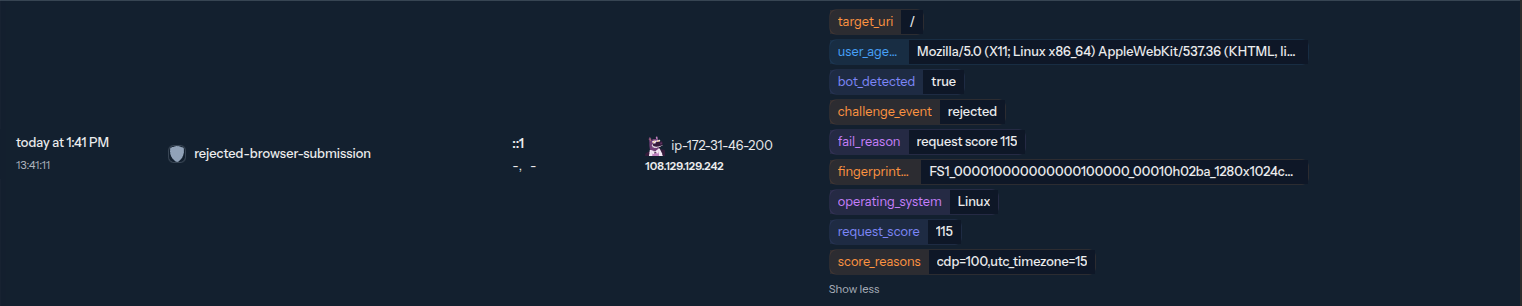
The context column is hidden by default in the Console. If you don't see these tags, enable it (or switch on Comfort view) as described in Alerts Context. Without it, a rejection shows up but not the score that caused it.
Fields available to a custom context
The context above is what the shipped file exposes. The event carries more, and you can surface any of it with your own alert context:
| Meta key | Contains |
|---|---|
challenge_event | requested, submitted, failed, rejected or solved |
challenge_fail_reason | The reason string passed to RejectSubmission() |
request_score | The total score |
request_score_reasons | Per-signal breakdown, cdp=100,utc_timezone=15 |
challenge_difficulty | The proof-of-work difficulty applied to this moment |
fsid | Fingerprint id |
fingerprint_bot | The in-browser fast-bot verdict |
os, http_user_agent, source_ip, target_host, target_uri, request_uuid | Request identity |
A few event fields are not promoted to evt.Meta by the shipped parser — method, platform, fingerprint_allowlisted and fingerprint_allowlist_reason. A context expression can still read them from evt.Parsed, and the whole decoded fingerprint is available under evt.Unmarshaled.fingerprint. See From a scenario for the full list of flat fields.
Behavioral scenarios it installs
Per-request hooks only see the request in front of them. The collection also installs two scenarios that watch the bigger picture and create decisions for repeat offenders:
| Scenario | Type | What it catches | Outcome |
|---|---|---|---|
crowdsecurity/appsec-bot-challenge-too-many-requests | leaky | An IP is served the challenge page repeatedly but never submits it. | Block |
crowdsecurity/appsec-bot-challenge-too-many-submissions | leaky | An IP submits the challenge many times, typical of an automated solver or a script brute-forcing the fingerprint. | Block |
These are regular scenarios, so they show up in cscli alerts list, in the Console, and in your decision stream as you would expect.
Known bots it lets through
Some non-browser clients are legitimate and must not be challenged (search-engine crawlers, uptime probes, AI crawlers, and the like). The collection recognises them and skips the challenge for them.
The exemptions are shipped as opt-in appsec-bot-challenge-exclude-* appsec-configs. Each one runs a hook that matches a verified bot with MatchKnownBot() and flags it with ExemptFromChallenge(reason); For example, the AI-crawler exclude-config:
inband:
  pre_eval:
    - filter: MatchKnownBot(req.RemoteAddr, req.UserAgent(), req.URL.Path, "legit_bots/gptbot.json")
      apply:
        - ExemptFromChallenge("gptbot")
MatchKnownBot() checks the client IP against the vendor's published ranges and/or a forward-confirmed reverse-DNS lookup (FCrDNS); a bot is exempted only when it can be network-verified. A spoofed UA on an IP that does not belong to the vendor is not recognised and goes through the normal challenge flow. The bot definitions live in bot-description files that each exclude-config declares in its own data: section.
ExemptFromChallenge(reason) exempts the current request only, it does not issue a cookie.
The built-in bot families are split across four identity exclude-configs, so you can install only the ones you need:
| Appsec-config | Bots it verifies |
|---|---|
crowdsecurity/appsec-bot-challenge-exclude-search-engines | googlebot, bingbot, applebot, amazonbot, yandex, baidu, yahoo, sogou, qwant, babbar, duckduckbot |
crowdsecurity/appsec-bot-challenge-exclude-ai-crawlers | gptbot, openai-searchbot, openai-chatgpt-user, perplexitybot |
crowdsecurity/appsec-bot-challenge-exclude-social | meta, discord, telegram, twitterbot, pinterest |
crowdsecurity/appsec-bot-challenge-exclude-monitoring | uptimerobot, cookiebot, datadog, pagerduty |
Each config declares the datafiles CrowdSec should download into <datadir>/legit_bots/ in its data: section, and MatchKnownBot() reads them at match time. To recognise a bot of your own, see Authoring your own known-bot files.
Path-exclusion configs
The appsec-bot-challenge-exclude-* family has two kinds of members: the identity exclude-configs above (which match verified bots with MatchKnownBot), and the path exclude-configs described here (which match on the request path). Both flag the request with ExemptFromChallenge(reason).
Some routes are hit by design by clients that will never solve a challenge: crawler metadata files, syndication feeds, third-party webhooks, static assets, and programmatic API endpoints. Challenging them just produces false positives. The collection ships five opt-in path exclude-configs whose pre_eval calls ExemptFromChallenge(reason) for those paths (exempting the single request, no cookie minted):
| Appsec-config | Exempts |
|---|---|
crowdsecurity/appsec-bot-challenge-exclude-crawler-files | /robots.txt, /.well-known/*, /security.txt, /sitemap.xml, /ads.txt, … |
crowdsecurity/appsec-bot-challenge-exclude-feeds | RSS/Atom feed paths (/feed, /rss, /atom.xml, …) |
crowdsecurity/appsec-bot-challenge-exclude-webhooks | /webhooks/* |
crowdsecurity/appsec-bot-challenge-exclude-static | static assets and media (.css, .js, images, fonts, /manifest.json, …) |
crowdsecurity/appsec-bot-challenge-exclude-api | programmatic endpoints (/api/*, /graphql, /wp-json/*, /oauth/*, …) |
They are separate configs so you can drop any that don't apply to your app, but keeping them on is the recommended default for fewer false positives. Enable bot detection shows how to load them from your acquisition. To add your own exclusions, ship a custom appsec-config rather than editing these.
For the request flow end to end and the device data the challenge collects, see How it works.